CR10 Smart Pro AB Temp issue - next steps?

Ok. It’s Friday, I’ve spend too much time dealing with MS PowerShell, and while many are watching the Blue Jays and the Dodgers game tonight after the trick or treaters have made the rounds, I decided, with a mounting headache to start troubleshooting the latest temp failure.

In the past 4 to 5 months, I’ve been printing in PETG, though sporadically (that aforementioned demon PowerShell being the reason), prior to that, my printing has all been PLA. I mention this because temps and power draw may be factors I need to consider.

I, and my eldest daughter, have been running various jobs with the higher print temps needed for PETG - she was getting very good results for her needs with a temp of 240C, I was still tinkering for the sweet spot and was still running stuff around 230.

Under PLA, I had one AB temp warning, and a nasty nasty blob (mentioned here in the past) Using PETG, I’ve had 3. The first one of those about 3 or 4 weeks into the inital testing, with the next one happening mid August during a long print for my daughter, after that replacement I had to order more hot end kits but the fully assembled ones Creatity bundled/sold weren’t to be found anywhere that I could find in Canada, so I had to go to the assemble it your self kits and went the Ali Express route to replenish my stash of spares.

Last weekend, during what was to be an 8 hour job, that last fully assembled/sold as a creality official hot end failed. I swapped it out with one of the kits from Ali Express. re-ran the print job. no problem. phew.

Next day, I decided to print something for myself that would take 2 hours. I got my test print done, but it wasn’t quite up to snuff dimensionally, so I made a change to size, tossed it back to the printer. After 3 mm of print height was achieved, the AB temp warning was back.

So, out comes another Ali Express hot end assemble yourself kit - get it all in, tightened up etc. do my manual leveling, then the ABL test, and ran about 20 mm of PETG through at about 225 C as a primer. tossed my print job at it again, only to get the AB temp warning as soon as it tried to get to the printing temp of 240C (I decided to go with that this time). It was late, I was sweary, so I walked away as one should.

Tonight, I did the techie thing, and tested the resistance readings for my unused thermistors and heating elements, and because I’d hoped to reuse some elements from the failed kits one day, I actually was able to go back and check all of them, plus the one on the printer. All of them are within the nominal readings for the thermistor at room temp, and the heater elements at room temp. (between 97kOhm and 110 kOhm for the thermistors, and all under 18 Ohm’s for the heaters - lowest was 12)

Tigger doesn’t think it’s the thermistor or heating elements anymore.

I’m thinking it’s the Motherboard, or the Power Supply, but I’m not sure how to correctly figure out which is the most likely one to be the problem. I noticed that Creality has pretty much stripped the CR10 Smart Pro from their site, and I’m not having the best of times with the AI based search engines tonight - what worked for me in the past with google really doesn’t play nice in the AI enhanced search tools (grrr), or it’s that headache I mentioned turning my brain to mush.

So, before I embark on another debug project where I take over the dining room table for a day or two to troubleshoot at the circuit level, I thought I’d see if the collective wisdom here had any brilliant ideas on the next steps. I can’t even honestly remember if there’s a se[arate fuse in the chassis for the hot end’s heater or not… hmmm… (wanders away on the internet to try and find that out)

Well that sounds sucky. I am sorry you are finding this an issue. Personally, my experiences with Creality is similar, cascading failures, one thing gets solved and something else failed. In my case after a lot of frustration and expense I gave (I was helping a friend, we gave) up. The time money and reliability problems prompted a new printer.

I do not have a idea. I am going to offer a bit of advise. Decide now how much time and parts it is worth it for you. Basically draw a line in the sand now that is the new printer line. I have personally put more than the cost of a new printer into parts for an older printer twice. I have a mediocre printer that was purchased for $650. that has $500 in parts and makes crap prints. I should have bought a better printer, I chased the issue and ended up replacing all the electronics and ½ the physical parts. it prints reliability now but it never was a good printer and prints reliably mediocre prints. Don’t do this.

well, technically, that’s an idea :slight_smile:

And yes, I have considered that and noted that the main boards for these things have wildly different prices, just like the hot end kits did. I’m willing to put the time to diagnose the issue properly. From there, I’ll assess the cost of parts/time to obtain (courier and obvs. tariff dependant). If I do walk away from this unit, I will likely be out of 3d printing for the next year or two - that other hobby known as a house ate my budget. :wink: For me, it is a hobby, and hobbies have a way of not having limits, but I also just want it to work, which until this, it did.
one thing at a time I guess.

230 Deg. doesn’t sound hot to me. I can’t see that being part of the problem unless you have defective parts, always a possibility.

Agreed, this printer is rated to 300 C at the nozzel. I’d expect problems at 285 tbh.

It could be a problem in the wiring harness. I guess I will get permission to take over the dinig room table and do some more tracing.

Sooo many screws… thank goodness for magnetic parts trays.

Hopefully the printing Gods will look favourably upon you.

Sooo, yah. it’s not great, but I found two issues when I finally had a night with nothing else getting in the way of disassembly.

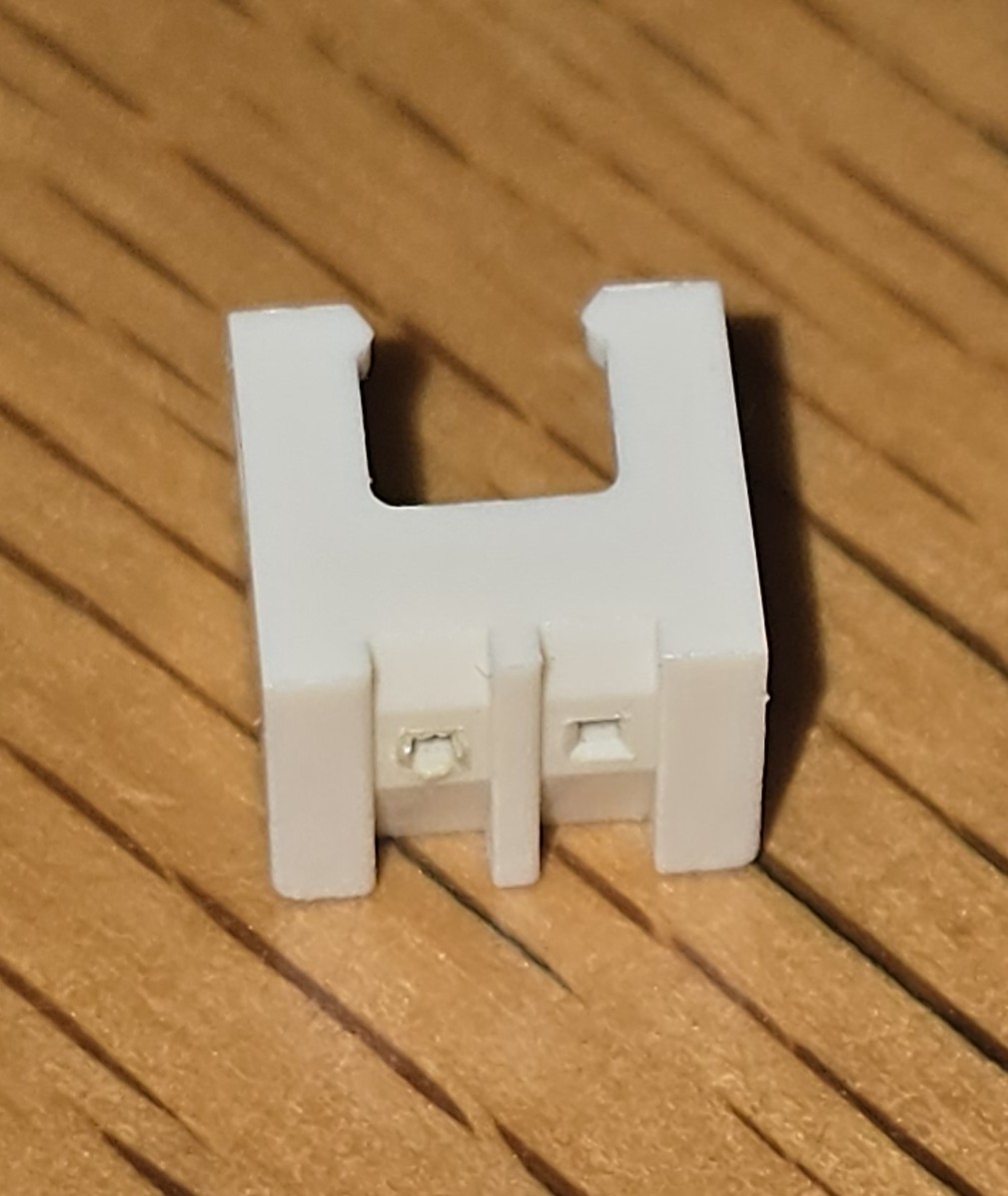
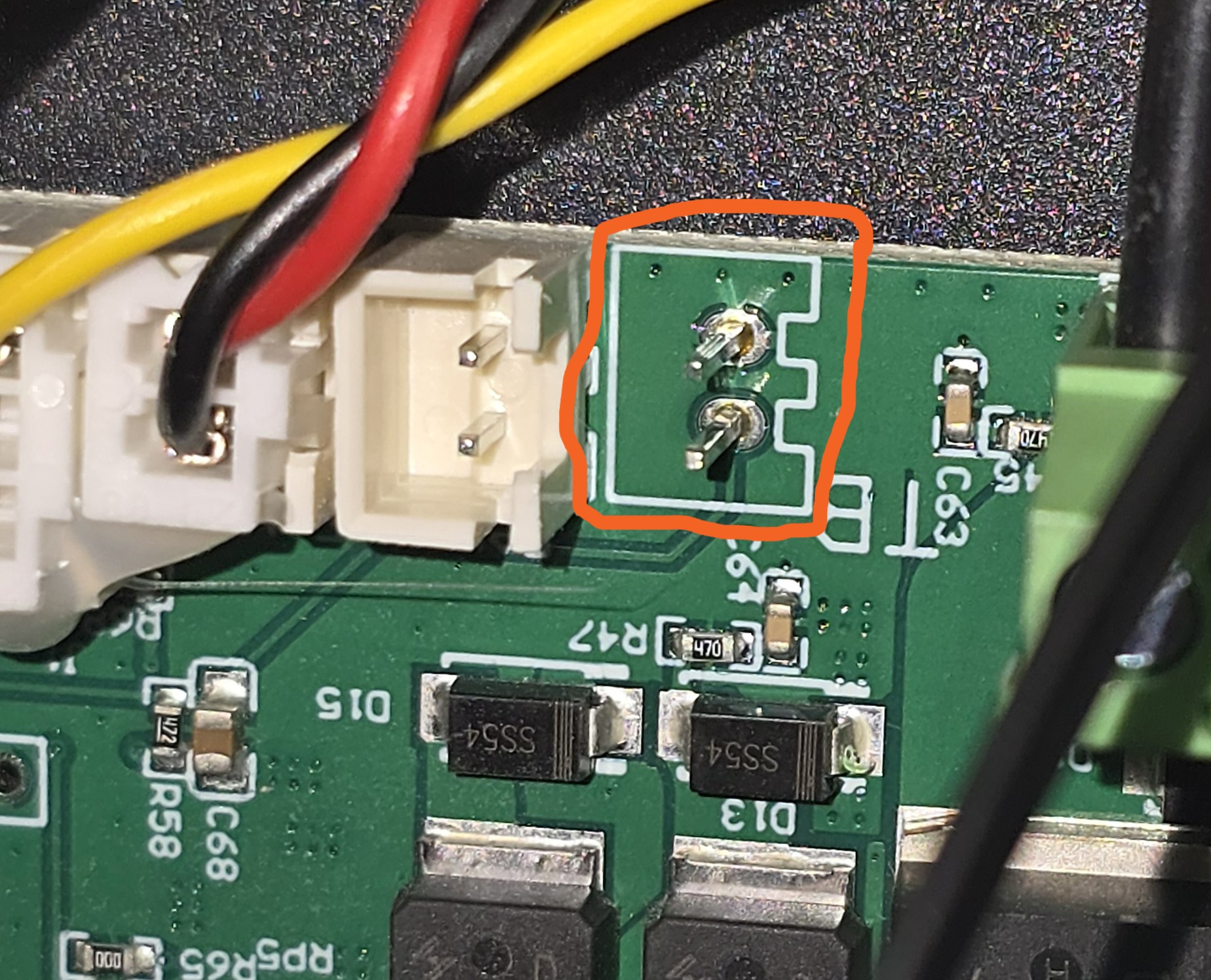
One, the thermistor JST female connector’s plastic casing completely let go from the pins - I was following the Creality guide for figuring out runaway temps, but it’s useful for AB temp troubleshooting steps.

I do have a whack of JST connectors so, if my current fix fails to hold, I’ll solder a new one in, but a bit of Bondic glue (which necessitated yet another a jury rig wrt. batteries to power the uv emitting led to cure the glue) fixed that (I know Yarkspiri commented on all of the hot melt glue in her videos on the CR 10 Smart and CR10 Smart Pro, but that’s to keep the male part in the female socket.) I don’t think having the socket detach is normal, but here we are.

The second issue which is the root cause, I found by sheer dumb luck. I was testing to see if the unit would give me 24V on the pins where the heater element connects to the sprite extruder pinout board. First attempt it went AB temp and I got nothing. Second try, I had shifted the extruder and it fired up. I got my probes in, got -24V (head scratcher) but a random finger twitch against the wire harness caused the fan to power down.

Hmm… tapped the wire harness again. fan fires up. tap, off. tap on.

sigh.

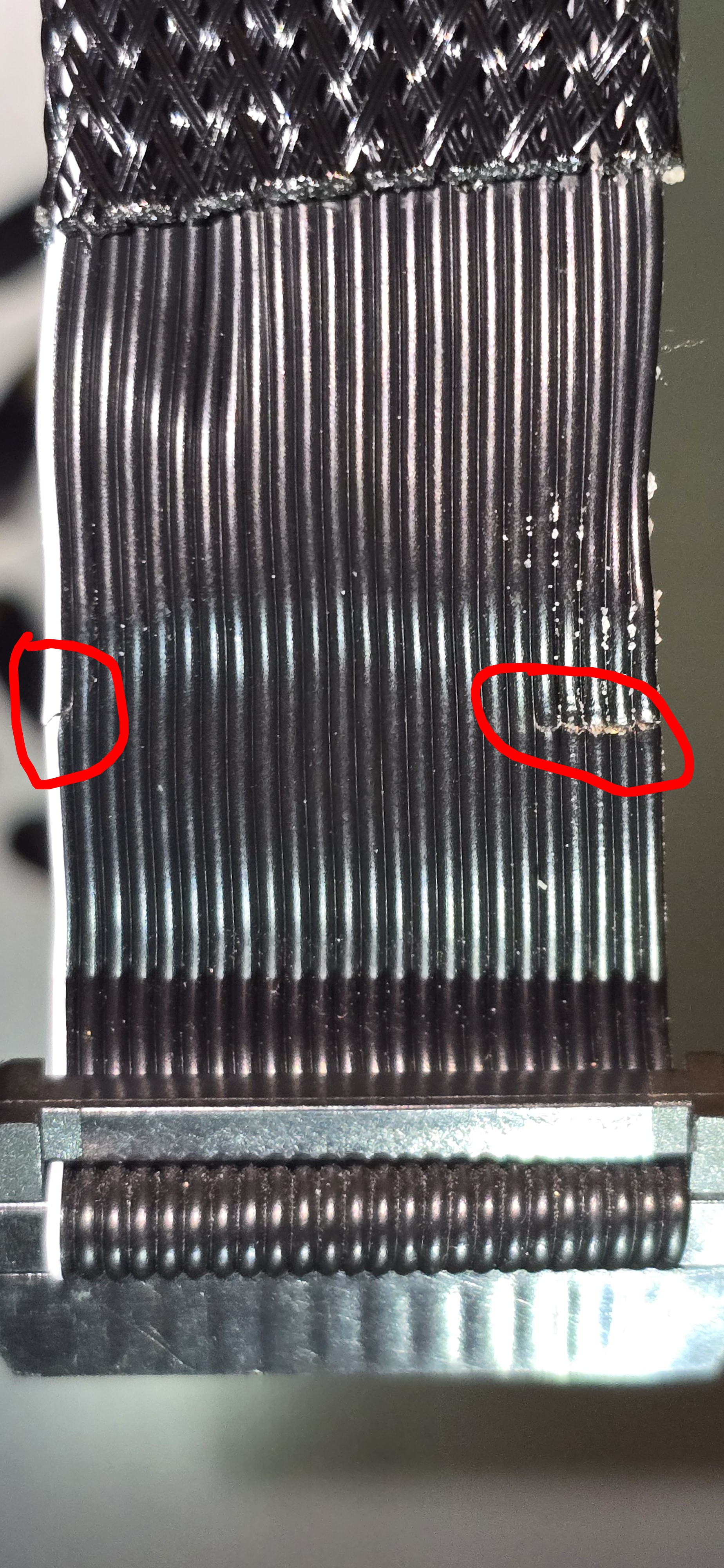
Unwound what felt like 8 inches of fabric tape to discover this:

So, that nice fabric tape that was holding the braided ribbon cable cover in place, was actually hiding the fact that the cable was slowly over flexing and snapping (and may have actually contributed to making things too stiff, and accelerated the wear). This also explains some random print failures that happened any time after 3 cm of print height was being achieved.

Sadly, our hosts do not have the cable in stock. Heck, even Creality isn’t listing it on their website, and if you read the site, you’d almost think they’ve disavowed the entire CR series of printers - almost impossible to find working links relating to them. (shakes head)

Google foo to the rescue, despite the AI “helping”, and I found Spool3D had one in stock. Ordered it. With luck it’s here sometime early next week.

Decided to see if I could locate another one. hm. Only on AliExpress (well, I did find one in Australia, but I’m not ordering from there ever again, not after a shipment vanished without a trace and I was out some not insignificant coin - I blame the venomous spiders).

Even on Ali Express, finding just the cable for the CR10 Smart Pro was hard - again, only one in stock, took a deep breath, and ordered it.

I wonder if she-who-must-be-obeyed will let me leave the printer disassembled on the kitchen table into next week. :thinking:

If not, I’m going to buy a light duty cordless screw driver, that case has too many freaking screws! :face_with_bags_under_eyes:

Hopefully, that’s the end of it once I get through the joy of removing the old cable harness, and weaving the new on in.

See the printing Gods were looking favourably upon you.

I suppose so! Finally got it all back together tonight. Because I know now, I looked at the the new cable, it was going to fail at almost the same spot, for the same reason - usage flex. The strain relief braid stops right at the hard edge of the plastic board the pcb is atrached to.

Temporary solution was to slide a bit of corrigated cardboard behind the ribbon before clamping it in place. That will give me time to figure out a better solution for keeping the bend radius from getting too sharp.

I see why some use those nice chain like cable management bits, just not sure it will help with the CR10 smart Pro’s design here. I feel a round cable would be better over ribbon.

Thinking cap on…

Will retune the ABL etc. another day, she who must be obeyed wants to watch more STNG, so I shall do that.

There are strain relief cable coverings available, sort of a weaved mesh.

Yeah, technically, the original, and the first replacement are both covered in that stuff, but, they both end 1.5 to 2 cm before the connector. That essentially means the cable is not protected by more than that black fabric tape they love. Also, I think there needs to be 35 to maybe 38 cm of cable clear from where the x axis power and limit sensors.

I get that over several thousand units, keeping this as short as possible means x many more cables made, but it increases failure rates, and customer dissatisfaction.

Guess it doesn’t really matter to Creality, they’ve dropped the CR line it seems and are going all in on enclosed systems.

I did find a nice strain relief bracket model out there. I may see if that will adapt to my printer’s back plane for the sprite extruder, and if so, that should help immesly. I am probably also going to just build my own cable. 2 or 3 extra cm of ribbon won’t kill the stepper. :slight_smile:

I printed out some “cable chain” for the old Frankenender, it worked well enough. I don’t remember how it was fixed to the printer. If you go that route use PLA Plus or Pro, different names same thing. Small parts like then break easy with regular PLA but the PLUS/PRO is flexible enough to hold up.

most manufacturers are going to fully enclosed or at least mostly with open parts or vented. There are very valid safety reasons for this and more and more test data and observation are increasing. I think he days of open frame machines are ending soon. Likely for the best, micro particles are not good for you.

Creality has never been good at changing designs to fix well known issues they have in the past shipped a faulty design waited for it to break then suggest a community solution. most working creality machines have been modded to correct manufacturer issues.

So, I’ve noticed. Ah well, I knew this was a tinkerer’s hobby when I started… Just didn’t think I’d be re-engineering the tool as much as I seem to be. :slightly_smiling_face: I bought this unit because it was considered most likely to just work. Which is what I wanted, so I could do other sorts of tinkering. :slight_smile:

Haven’t had time to re-tune the ABL, etc. since the cable change - life has a habit of getting in the way. soon, I hope, soon….

1 Like

Serious under statement!

That is changing now. Many modern printers work out of the box minimal set up and generally no modifications or changing needed. They just work. Most of my personal machines are stock unchanged. The sprinter is not my hobby, building things is, the printers are just tools.

Oh, I recognize that, and I did want this to be a “just works” unit, as I was envisioning it to help make one time use welding jigs etc. or to mock up stuff to be made in metal, or other material. All the same, I’m just stubborn enough to want to know how to fix my tools too, when possible. :slight_smile:

Ah well, finally feeling a bit better from the flu that hit me earlier this week, at least enough to re-do the ABL stuff, and getting the strain relief bracket printed. Can tell I still have to tweak the z-offset but, it’s printing on try two.

argh. spoke too soon. looks like I’m replacing another hotend.

This latest one was oozing everywhere. checked the nozzle tightness, and it sheered right off.

grr.

tomorrow problem now. Need to stay ahead of this bloody flu and get better.

Its been so long since I had to replace a nozzle and took it down. Only my MK3s+ has the system of what I use now and with an E3D X in it I have had no need to change it. Do you have a tork nozzle wrench? If not get one it makes life a lot simpler.

No, but I do have a torque wrench for my bike work that goes this low, just don’t have the socket ends as it’s a driver bit kit based unit for all of the hex bolts on bikes these days.

New hot end assembled, installed and tested. The z-offset is now -3.0. Seems to get lower every time I touch this thing. Strain relief bracket printed - so clean up of the supports for that, and installation are next.