Hello all. I just joined the forum, hoping to learn more from you all.
A little history…many years ago I purchased a Big Box Pro 3D printer when it was part of a Kickstarter in Britain by the folks at E3D. I was very pleased with how it worked. I stored the printer for many years and have decided to use it again.
In any case I have having some issues and am hoping there is some out there who would be kind enough to help me. Thanks everyone!
Welcome to the forum. I’m sure we can help screw things up worse then they are now. 
OK not really but we will try to help as we can.
LOL Thanks. I’ve tried to start a new thread by discussing what went wrong. After typing my text, there is no place to click send/submit/whatever to post it. What am I doing wrong?
There should be a “submit” button under the place where you typed your message. It would be just like your original thread. Sometimes this forum software doesn’t play nice. I usually copy what ever I typed and save it and try again later, just copy the saved message into another thread.
Ya, the submit button wasn’t visible. I actually see it in my drafts, but when I open it up, it only allows me to keep typing or delete.
It appears that the bottom of the window is off my screen and I can’t move the window to access the bottom which is probably where the submit button is. Any suggestions? I closed the website and tried again, with the same results.
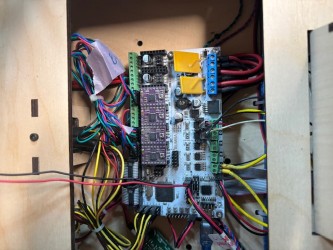
This is what I am trying to get help with.
After changing out my hot end to address a thermal runaway, I went to reload my filament and my extruder wouldn’t move. I moved the connections around on the board to connect the extruder servo to an axis I knew was working, and the extruder worked. This tells me it’s not the wiring or the servo, but what would cause this? Could the board malfunction like that? Could a reboot with new firmware possibly fix it?
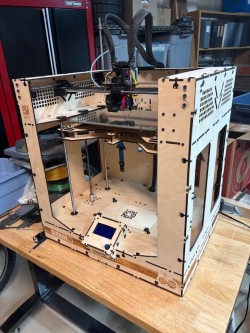
The printer I have is an old Big Box Pro, which has a SD card and what looks like a network connection, but no USB connection. If I need to upgrade the firmware, how is this done? Obviously I have much to learn and would appreciate anyone who is willing to help.
I feel like your printer has long since been gone. I could be wrong so being clean firmware could be an issue. Is It running clipper? Yes boards can jus pack it in.
I am going to just comment on myself. I work a lot and use my printers as tools. My hobby is designing and building things not tinkering with a printer.
With that in mind, it might be simpler to replace it?
On some printers the firmware is upgraded by loading it through the SD card.
Thank you.
I know it is old, but it really hasn’t seen a lot of projects.
I would hate to scrap this printer.
Thank you for your thoughts.
You might be able to replace parts with new after market ones. Can you send specific information about it. It might help.
Firmware type
Mother board brand (if different from the printer brand)
ETC.
Pictures will help also.
Ok that’s fair.
If you can get a new copy of the system and configuration it is not overly hard to replace that on the board.
That will tell you if it is physical or software.
I does sound like a board to me so I’d replace the board and might as well do the drivers too at this point. If software doesn’t help.
If you have new cables I’d do them first but it seems unlikely.
Thank you for your thoughts.
I’m pretty sure it’s not the cables because when I plug them into a connection to a servo that works the extruder servo comes to life.
E3D responded with a thought that it could be a fuse, which would be awesome. They attached a wiki sheet which closely matches my system, but I can’t find any helpful info on fuses or where they are lol.
Do you know anything about this?
Perhaps I can move a fuse from an unused extruder location to the one I use?
I have never uploaded new firmware and am a bit nervous about that. I would love someone to walk me though it as I do it, but don’t know how to find that person.
Here are pictures of my printer.
I am not feeling comfortable replacing electronic components.
E3D thinks it could be a fuse, which would be awesome. I can’t find any information on the provided wiki page about any fuse locations however. How do I find out about the fuses? If each motor has a fuse, I could take one from the 2 spots reserved for extruders which are not being used possibly?
I can’t make out much from the pictures. Do you see any fuses in the printer, on the mother board or elsewhere? if there are some can you check them to see if they are good, you would need a continuity meter, VOM or some other way to see it current flows through them (you need to take them out of the printer first or you might get false readings) for that. That would be the first step.
Alas, I have made the decision to scrap the printer. It is no longer supported by the manufacturer. I would rather start with a new machine. Thank everyone for all your suggestions.
That printer would be considered an antique by today’s standards. Early days laser cut construction. You might want to keep it as a bit of history.
P.S. does the manufacturer still exist.
Antique for sure. I’ve decided to get a new one. Thank you for all your thoughts!
Its likely a lot less hassle, sadly.
There are a number of machines that are turn key operations these days that basically work with out tinkering out of the box. Bambu (not the MMU add on) for the most part do being the most well known and supported.
Prusa has the most upgradable paths if that matters. You can take a printer from 2012 version to the newest version if you really wanted too. (impractical but Prusa does have kits and instructions it would cost more than a new machine but you still could.)
More practically you could fairly easily go from an almost ten year old printer to the latest greatest version. Again if that matters.
Most other companies just discontinue and widow old printers fairly quickly. I have two 3 year old ones that are no longer supported by the original manufacturer.
The problem with Prussa is the price, serious bucks for the capacity. And don’t forget Josephs ego.