Here are some steps to troubleshoot and resolve the problem:
-
Check Physical Connections:
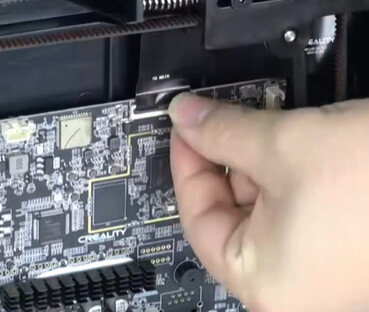
- Ensure that all cables, especially the ribbon cable connecting the touch screen, are securely connected. Loose or improperly seated cables can cause the screen to be unresponsive.
Service Tutorial K1C The mainboard replacement: Time 1:50 - https://www.youtube.com/watch?v=Yt04dH-B3eA
- Ensure that all cables, especially the ribbon cable connecting the touch screen, are securely connected. Loose or improperly seated cables can cause the screen to be unresponsive.
-
Update Firmware:
- An outdated firmware can lead to touchscreen malfunctions. Updating the firmware has resolved similar issues for other users. Service tutorial K1C flashing the firmware - https://www.youtube.com/watch?v=9xE94LStneI
-
Power Cycle the Printer:
- Turn off the printer, wait for a few minutes, and then turn it back on. This simple step can sometimes resolve unresponsiveness.
-
Factory Reset:
- If the issue persists, consider performing a factory reset. This will revert settings to default but may resolve software-related problems.