Hi All,
I have an ender 3 v2 purchased in 2020. Worked well - dozens of prints.
Upgrades included: Capricorn PTFE tube / Marlin firmware / inverted bed (printing on glass side) / New bed springs.
In 2024 upgraded to Sprite pro direct drive. This has worked for a couple of dozen prints, BUT now I have an issue with getting consistent extrusion.
The filament extrudes in dashed lines (see image), which makes me think there is an issue with the gears in the extruder.
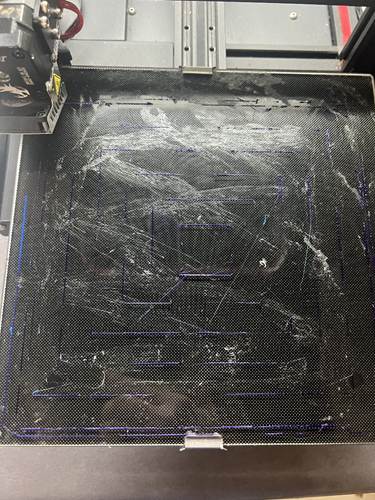
I tried:
- Cleaning the nozzle.
- Disassembling the direct drive and cleaning as per the Edge of Tech youtube guide :
(14) How To Fix A Jam on the Ender 3 S1 Pro (FULL Walkthrough) - YouTube
Error! Filename not specified.
There was filament stuck in the nozzle, which I removed
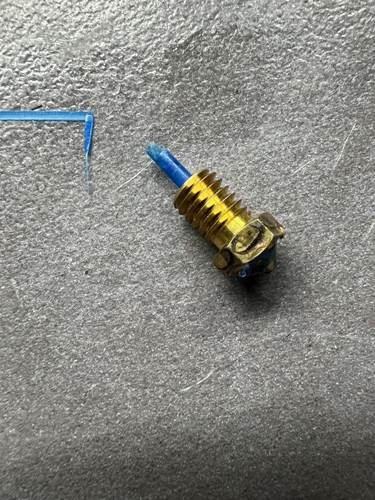
The gears on the direct drive did not look clean, but I’m not sure how to fix this :
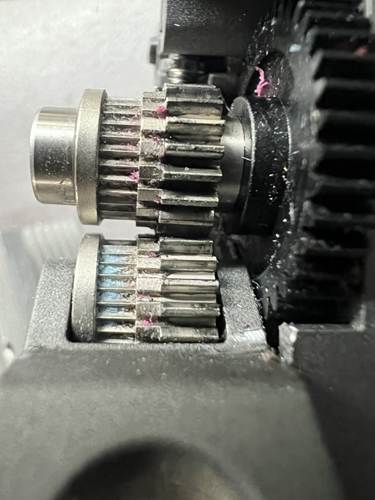
Is there a way to fix this?
Or does Creality sell sprite pro gears as a spare part?
I checked the PTFE tube and re-installed the sprite pro.
Thinking maybe this was a filament issue I grabbed a roll of PLA that had been in a filament dryer (Sunlu S1) AND also printed correctly on my Prusa Mini+ but the result is the SAME.
With stock Ender 3V2 i’ve printed : ~140 designs
With the Sprite Pro direct drive i’ve printed : ~20 designs
I.e. the Sprite pro hasn’t seen a lots of printing.
Please advise the steps to resolve this Sprite pro extruding issue with my Ender 3.
Printer : Ender 3 v 2
Extruder : Sprite Pro
Firmware : Marlin 2.0.7.2
Slicer : PrusaSlicer 2.9.4
Filament : PLA Polyalchemy Elixir purple (last tried).
Nozzle : brass 0.4mm
Image of printer prior to sprite pro upgrade here:
Ender 3 Halo LED light XL by aussieinkguy | Download free STL model | Printables.com